# How do I set up my Farmstand Nook's Smart Timer with the Lettuce Grow app? 🎥
> Our Indoor Smart Timer is preset with expertrecommended settings for both the lights and pump all you need to do is plug them in We recommend using the
Source: https://support.lettucegrow.com/en_us/how-do-i-set-up-my-farmstand-nook-smart-timer-with-the-lettuce-grow-ap-B1cfD6ryJg
Last updated: 2025-06-13T19:43:15.516Z
Our Indoor Smart Timer is preset with expert-recommended settings for both the lights and pump - all you need to do is plug them in!
We recommend using the Indoor Smart Timer with the Lettuce Grow App for full control of the settings, but it can also be configured manually.
**Note: This item is for indoor use only and must be used with a GFCI outlet.**
Follow these simple instructions to get started:
* Download the Lettuce Grow app and login to your Lettuce Grow account.
* Visit Home > scroll down to My Farmstands > click “Connect a Smart Timer” and then follow the instructions.
* The lights need to plug into the left outlet and the pump into the right.
* If you experience any issues pairing the Indoor Smart Timer to your device, read our tips and tricks below.
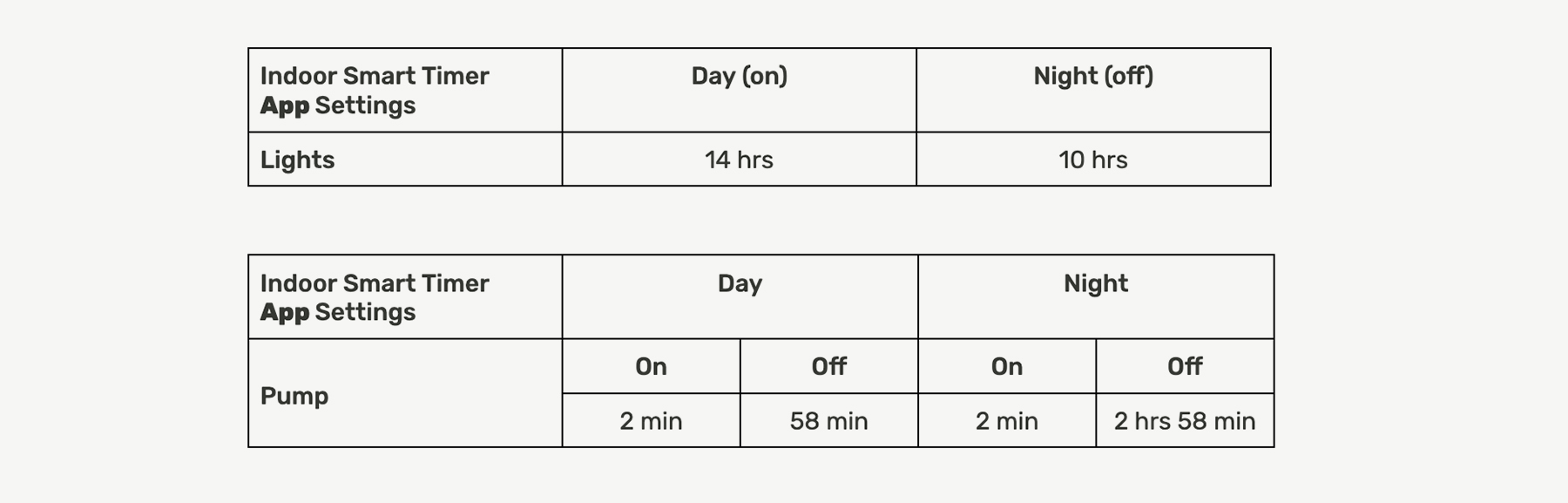
The default settings in the app come directly from our plant experts and are best suited for most growing environments. If your plants need something a little different, not to worry! Simply visit My Farm > Connected Smart Timer > Smart Timer Settings > Advanced Settings to make changes.
**Optional Functionality:**
* **Pump Test**
* Want to make sure your nutrients are well mixed? Need to test and adjust the pH of your water? The pump test feature allows you to run the pump at any time. Start a pump test directly through the app. Note: At the end of the pump test, the regular watering cycle will continue and will always start with the pump ON.
* **Timer Snooze**
* Need a break? Pause the Pump and Lights for 90 minutes through the app. The regular cycle will continue once the snooze is finished.